Please note that the advantage of Hashtable over generic Dictionary for insert and
search operations demonstrated here is actually because the tests are based on NON
generic IDictionary interface, so each insert or search action is accompanied with
check for the key type. For more information see the Sean's comment below. (Thanks
Sean!) Without that Dictionary seem to perform better than the Hashtable. The rest
of the test conclusions will not be affected. So to summarize, generic Dictionary
is the absolute winner for insert and search operations if used with generic dictionary
interface or directly.
This is a sequence of tests comparing the performance results for four different
implementations of IDictionary and in particular generic Dictionary, generic SortedDictionary,
the old non-generic Hashtable and generic SortedList.
I performed several tests, comparing the following parameters: memory used in bytes,
time for the insertion in ticks, time for the item search in ticks, and the time
for looping with foreach in ticks. The test was performed 8000 times for all the
four implementation, and the order was random so each implementation has been tested
at least 1000 times.
I performed the tests in five stages, to observe the relationship between the number
of entries and the performance. In the first stage the collections had 50 items,
in the second 500, in the third 5,000 in the fourth 50,000 items.
In this particular test, lower numbers of memory usage or time taken for the execution
means better performance. So if we want to present visually a performance chart
for each of the parameters we have to deduce a performance coefficient from the
raw data. I have used the following code to calculate the performance coefficient:
Performance Coefficient
for value x = min(value 1, value 2, … value n) / value x
This way, because the best performing value is the lowest one it will be transformed
as value 1 of the performance coefficient and any other value will be a fraction
of that value.
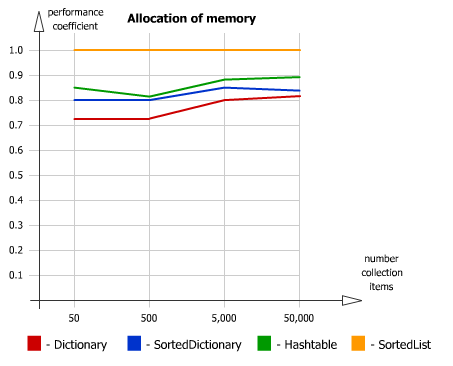
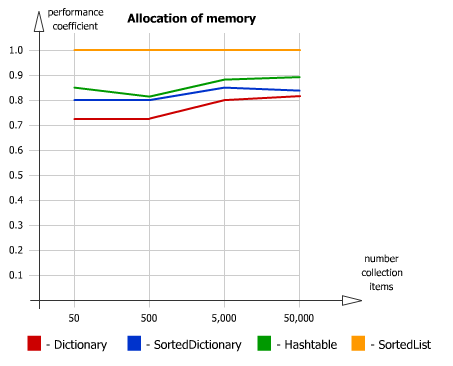
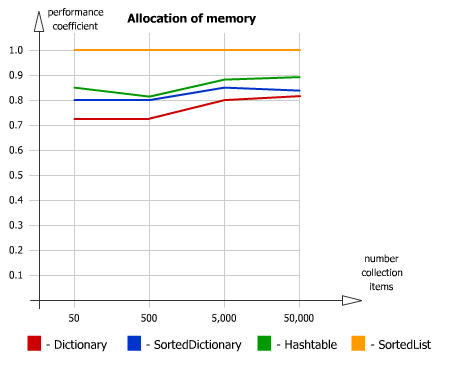
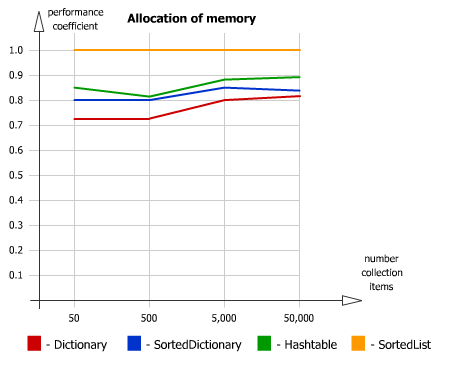
This is the chart of the memory usage:
The results stay consistent with the increase of the number of items in collections.
Best memory footprint we see in the
SortedList, followed by Hashtable,
SortedDictionary and the
Dictionary has highest
memory usage. Despite all that, we have to note, that the differences are not significant
and unless your solution requires extreme sensitivity about the memory usage you
should consider the other two parameters: time taken for the insert operations and
time taken for searching a key as more important. It is important to note that this
test does not take into consideration the effects of garbage collection and thus
can only be taken in a very general way.
This is the chart for the time taken for insert operations:
When the number of records is small the differences between all four implementations
are not significant but with the increase of items in the collection the performance
of the
SortedList drops dramatically,
SortedDictionary
is better but still taking significantly more time for inserts than the other two
implementations.
Hashtable is the next in the list and the ultimate
leader is the generic
Dictionary.
This is the chart for the time taken for search operations:
The absolute leader is
Hashtable, but the test does not consider
the type of item being stored. That could be a possibility for a future test. The
next best performer is the generic
Dictionary followed by the other
two implementations. The differences here between
SortedList and
SortedDictionary are not significant.
This is the chart for the time taken for for-each collection loop operations:
Here the leader is
SortedList then
Dictionary
consistantly better than
Hashtable and the words performer is
SortedDictionary
Here you can see the task manager during the test it shows us a picture of the memory
usage. Area A is during the insertion phase when more and more memory has been allocating.
Area B is from the end of the insertion until the garbage collection of the object.
This is the code I used for this test. The variable NumberInsertedKeys was changed
to 50, 500, 5000, 50000, or 10000 for the different stages.
using System;
using System.Collections;
using System.Collections.Generic;
using System.Diagnostics;
/*
to compile enter in the command prompt:
C:\WINDOWS\Microsoft.NET\Framework\v2.0.50727\csc IDictTest.cs
to run enter in the command prompt:
IDictTest
*/
namespace IDictTest{

    public class RunResult{
        public decimal MemoryUsed;
        public decimal InsertTicks;
        public decimal SearchTicks;
        public decimal ForEachTicks;
    }

    public class Program
    {

        private static int SearchIndex = 27;
        //private const int NumberInsertedKeys = 50;
        //private const int NumberInsertedKeys = 500;
        //private const int NumberInsertedKeys = 5000;
        private const int NumberInsertedKeys = 50000;
        //private const int NumberInsertedKeys = 100000;
        private const int NumberTests = 8000;

        private static readonly string[] Letters =
                {"A","B","C","D","E","F","G","H","I","J"};

        public static void Main(string[] args)  {
            try{
            // TRY STARTS HERE ----------

                List<RunResult> listDictionary = new List<RunResult>();
                List<RunResult> listSortedDictionary = new List<RunResult>();
                List<RunResult> listHashtable = new List<RunResult>();
                List<RunResult> listSorderList = new List<RunResult>();
                Stopwatch watch = Stopwatch.StartNew();

                for(int i = 0; i < NumberTests; i++){
                    SearchIndex += 1;
                    Random rand = new Random();
                    int randInt = rand.Next(0, 4);
                    if(randInt == 0){
                      listDictionary.Add(
                          Test("Dictionary", new Dictionary<string, string>(), i));
                    }else if(randInt == 1){
                      listSortedDictionary.Add(
                          Test("SortedDictionary",
                              new SortedDictionary<string, string>(), i));
                    }else if(randInt == 2){
                      listHashtable.Add(
                          Test("Hashtable", new Hashtable(), i));
                    }else if(randInt == 3){
                      listSorderList.Add(
                          Test("SortedList", new SortedList(), i));
                    }
                }

                Console.Clear();
                Msg("Time taken (minutes): {0} or about {1} minutes and {2} seconds",
                    watch.Elapsed.TotalMinutes,
                    watch.Elapsed.Minutes,
                    watch.Elapsed.Seconds);

                RunResult resultDict = CalculateAvg(listDictionary);
                RunResult resultSortDict = CalculateAvg(listSortedDictionary);
                RunResult resultHash = CalculateAvg(listHashtable);
                RunResult resultSortList = CalculateAvg(listSorderList);

                RunResult min =
                    new RunResult{
                        MemoryUsed = Math.Min(Math.Min(Math.Min(resultDict.MemoryUsed, resultSortDict.MemoryUsed),resultHash.MemoryUsed),resultSortList.MemoryUsed),
                        InsertTicks = Math.Min(Math.Min(Math.Min(resultDict.InsertTicks, resultSortDict.InsertTicks), resultHash.InsertTicks), resultSortList.InsertTicks),
                        SearchTicks = Math.Min(Math.Min(Math.Min(resultDict.SearchTicks, resultSortDict.SearchTicks), resultHash.SearchTicks), resultSortList.SearchTicks),
                        ForEachTicks = Math.Min(Math.Min(Math.Min(resultDict.ForEachTicks, resultSortDict.ForEachTicks), resultHash.ForEachTicks), resultSortList.ForEachTicks)
                    };

                // print the results
                PrintResults(resultDict, listDictionary.Count, min, "Dictionary");
                PrintResults(resultSortDict, listDictionary.Count, min, "SortedDictionary");
                PrintResults(resultHash, listDictionary.Count, min, "Hashtable");
                PrintResults(resultSortList, listDictionary.Count, min, "SortedList");

            // TRY ENDS HERE ----------

            }catch(Exception ex){
                Msg("{0}", ex);
            }
        }

        private static RunResult CalculateAvg(List<RunResult> list){
            decimal sumMemory = 0;
            decimal sumInsert = 0;
            decimal sumSearch = 0;
            decimal sumForEach = 0;
            for(int i = 0; i < list.Count; i++){
                RunResult curr = list[i];
                sumMemory += curr.MemoryUsed;
                sumInsert += curr.InsertTicks;
                sumSearch += curr.SearchTicks;
                sumForEach += curr.ForEachTicks;
                // uncomment to print each line
                //Msg("{0,11} {1,13} {2,14}",
                    //curr.MemoryUsed, curr.InsertTicks, curr.SearchTicks);
            }
            return new RunResult{
                      MemoryUsed = sumMemory / list.Count,
                      InsertTicks = sumInsert / list.Count,
                      SearchTicks = sumSearch / list.Count,
                      ForEachTicks = sumForEach / list.Count,
                    };
        }

        private static void PrintResults(RunResult result, int count, RunResult min, string name){
            Msg("--------- Results for {0}", name);
            Msg("# Tests {0}", count);
            Msg("Memory Used Insert Ticks Search Ticks ForEach Ticks");
            Msg("Average Values:");
            Msg("{0,11:N} {1,13:N} {2,14:N} {3,14:N}",
                result.MemoryUsed,
                result.InsertTicks,
                result.SearchTicks,
                result.ForEachTicks);
            Msg("Performance Coefficient:");
            Msg("{0,11:N} {1,13:N} {2,14:N} {3,14:N}",
                min.MemoryUsed/result.MemoryUsed,
                min.InsertTicks/result.InsertTicks,
                min.SearchTicks/result.SearchTicks,
                min.ForEachTicks/result.ForEachTicks);
            Msg("");
        }

        private static void Msg(string name, params object[] args){
            Console.WriteLine(name, args);
        }

        private static RunResult Test(string name, IDictionary dict, int n){
            Console.Clear();
            Msg("Currently executing test {1} of {2} for {0} object",
                name, n + 1, NumberTests);
            RunResult rr = new RunResult();
            Stopwatch watch;
            Random rand = new Random( );
            long memoryStart = System.GC.GetTotalMemory(true);
            long insertTicksSum = 0;
            for(int i = 0; i < NumberInsertedKeys; i++){
                string key = GetRandomLetter(rand, i)+"_key"+i;
                string value = "value"+i;

                watch = Stopwatch.StartNew();
                dict.Add(key, value);
                watch.Stop();

                insertTicksSum += watch.ElapsedTicks;
            }
            rr.MemoryUsed = System.GC.GetTotalMemory(true) - memoryStart;


            rr.InsertTicks = insertTicksSum;

            watch = Stopwatch.StartNew();
            object searchResult = dict["C_key"+SearchIndex];
            watch.Stop();

            rr.SearchTicks = watch.ElapsedTicks;

            watch = Stopwatch.StartNew();
            foreach(var curr in dict){}
            watch.Stop();

            rr.ForEachTicks = watch.ElapsedTicks;

            return rr;
        }

        private static string GetRandomLetter(Random rand, int i){
            if(i == SearchIndex){
                return "C";
            }
            return Letters[rand.Next(0, 10)];
        }

    }

}
The computer used for the test has the following characteristics:
Processor: Intel(R) Core(TM)2 Duo CPU T7300 @ 2.00GHz 2.GHz
Memory (RAM): 2.00 GB
System type: 32-bit Operating System
Windows Vista
These is the raw data. Memory Used is in
bytes and the insert,
search and looping time in
ticks:
Time taken (minutes): 0.324318411666667 or about 0 minutes and 19 seconds
--------- Results for Dictionary
# Tests 2063
Memory Used    Insert Ticks    Search Ticks    ForEach Ticks
Average Values:
 4,748.48 3,019.60 126.40 198.21
Performance Coefficient:
 0.73 0.92 0.83 0.80

--------- Results for SortedDictionary
# Tests 2063
Memory Used    Insert Ticks    Search Ticks    ForEach Ticks
Average Values:
 4,345.04 5,000.54 193.05 377.99
Performance Coefficient:
 0.80 0.55 0.55 0.42

--------- Results for Hashtable
# Tests 2063
Memory Used    Insert Ticks    Search Ticks    ForEach Ticks
Average Values:
 4,096.38 2,775.27 105.36 209.91
Performance Coefficient:
 0.85 1.00 1.00 0.75

--------- Results for SortedList
# Tests 2063
Memory Used    Insert Ticks    Search Ticks    ForEach Ticks
Average Values:
 3,488.50 4,350.48 167.89 158.41
Performance Coefficient:
 1.00 0.64 0.63 1.00

8000 tests 500 collection entries
Time taken (minutes): 1.26410570333333 or about 1 minutes and 15 seconds
--------- Results for Dictionary
# Tests 2158
Memory Used    Insert Ticks    Search Ticks    ForEach Ticks
Average Values:
 53,353.52 28,345.86 123.94 1,051.16
Performance Coefficient:
 0.73 0.96 0.92 0.71

--------- Results for SortedDictionary
# Tests 2158
Memory Used    Insert Ticks    Search Ticks    ForEach Ticks
Average Values:
 48,949.40 67,007.68 232.22 2,562.93
Performance Coefficient:
 0.80 0.41 0.49 0.29

--------- Results for Hashtable
# Tests 2158
Memory Used    Insert Ticks    Search Ticks    ForEach Ticks
Average Values:
 48,053.46 27,341.10 114.07 1,303.74
Performance Coefficient:
 0.81 1.00 1.00 0.57

--------- Results for SortedList
# Tests 2158
Memory Used    Insert Ticks    Search Ticks    ForEach Ticks
Average Values:
 39,077.27 54,255.06 209.31 744.81
Performance Coefficient:
 1.00 0.50 0.54 1.00

8000 tests 5000 collection entries
Time taken (minutes): 11.14550681 or about 11 minutes and 8 seconds
--------- Results for Dictionary
# Tests 1578
Memory Used    Insert Ticks    Search Ticks    ForEach Ticks
Average Values:
 527,352.00 274,339.83 171.81 9,724.85
Performance Coefficient:
 0.80 0.98 0.85 0.72

--------- Results for SortedDictionary
# Tests 1578
Memory Used    Insert Ticks    Search Ticks    ForEach Ticks
Average Values:
 498,944.56 853,251.69 288.00 22,777.03
Performance Coefficient:
 0.85 0.32 0.50 0.31

--------- Results for Hashtable
# Tests 1578
Memory Used    Insert Ticks    Search Ticks    ForEach Ticks
Average Values:
 480,048.17 268,945.01 145.19 11,911.69
Performance Coefficient:
 0.88 1.00 1.00 0.59

--------- Results for SortedList
# Tests 1578
Memory Used    Insert Ticks    Search Ticks    ForEach Ticks
Average Values:
 424,512.12 913,408.34 247.98 7,011.65
Performance Coefficient:
 1.00 0.29 0.59 1.00

8000 tests 50000 collection entries
Time taken (minutes): 299.723793791667 or about 4 hours, 59 minutes and 43 seconds
--------- Results for Dictionary
# Tests 1574
Memory Used    Insert Ticks    Search Ticks    ForEach Ticks
Average Values:
5,427,604.19 2,818,130.50 302.05 100,556.45
Performance Coefficient:
 0.82 1.00 0.87 0.73

--------- Results for SortedDictionary
# Tests 1574
Memory Used    Insert Ticks    Search Ticks    ForEach Ticks
Average Values:
5,318,944.00 10,506,892.94 525.14 294,219.13
Performance Coefficient:
 0.84 0.27 0.50 0.25

--------- Results for Hashtable
# Tests 1574
Memory Used    Insert Ticks    Search Ticks    ForEach Ticks
Average Values:
5,005,100.00 2,867,786.62 263.39 111,733.71
Performance Coefficient:
 0.89 0.98 1.00 0.66

--------- Results for SortedList
# Tests 1574
Memory Used    Insert Ticks    Search Ticks    ForEach Ticks
Average Values:
4,443,275.91 82,146,134.48 493.06 73,798.76
Performance Coefficient:
 1.00 0.03 0.53 1.00